 Click for full size · wheel to zoom · drag to pan
多字体文本生成与控制
Multi-Font Text Generation and Control
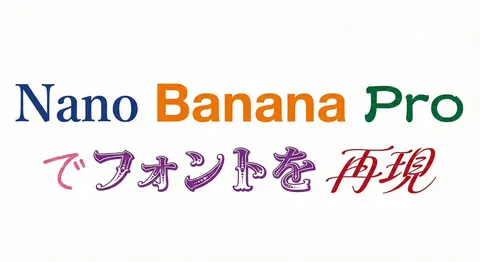
Two prompts demonstrating Nano Banana Pro's advanced text control capabilities, allowing the generation of a single string using multiple specified Japanese and English font styles, and even assigning different fonts to specific words within the string.
Please display the following string using the specified fonts. Express the background in white and the text in black. Generate 9 types of fonts in one go. # String {argument name="string 1" default="Nano Banana Proでフォントを再現"} # Desired Fonts Mincho (Serif) Gothic (Sans-Serif) Reisho (Clerical Script) Kanteiryu (Kabuki Font) Handwritten Decorative/Title (Display) Horror Cyber/SF (Tech) Calligraphy (Script) Furthermore, you can specify a particular font for a specific part of the string. Prompt: Please display the following string using the specified fonts. Express the background in white and change the color of the text for each font. # String {argument name="string 2" default="Nano Banana Proでフォントを再現"} # Desired Fonts Nano: Mincho (Serif) Banana: Gothic (Sans-Serif) Pro: Reisho (Clerical Script) で: Handwritten フォントを: Decorative/Title (Display) 再現: Calligraphy (Script)