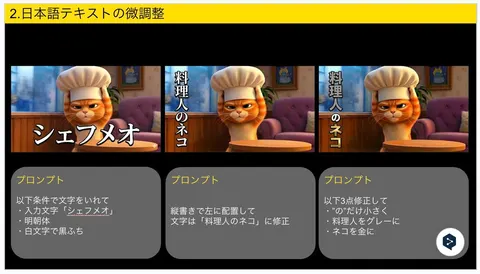
A detailed prompt demonstrating Nano Banana Pro's capability for fine-tuning Japanese text within an image. It allows for specifying vertical writing, font style, color separation, and even granular adjustments like changing the size and color of individual characters.
EnglishInsert text under the following conditions:
・Input text: "{argument name="input text" default="Chef Meow"}"
・Mincho font
・White text with black outline
Place vertically on the left
Correct the text to: "{argument name="corrected text" default="The Chef Cat"}"
Make the following 3 corrections:
・Make only the character “の” smaller
・Change “料理人” (Chef) to gray
・Change “ネコ” (Cat) to gold
 Click for full size · wheel to zoom · drag to pan